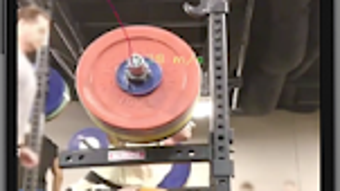

Download Barbell Tracker – barbell tracking, bar movement analysis, real-time bar tracking, Olympic plate detection, lift analysis, bar path tracking, velocity tracking, workout improvement, fitness tracking, strength training
Overview
Barbell Tracker is a specialized mobile application designed for strength training enthusiasts seeking to enhance their lifting performance through real-time analysis of barbell movement. The app focuses on detecting Olympic plates and tracking the trajectory and velocity of the bar during various exercises such as the clean and jerk, snatch, deadlift, squat, bench press, and overhead press. By recording and analyzing bar path, velocity, and lift dynamics, users can gain insights into technique, consistency, and efficiency.
The app is tailored for athletes, personal trainers, and fitness professionals who use barbell-based exercises as part of their training regimen. It operates on Android devices and is available at no cost, with optional in-app purchases for advanced features. Real-time feedback allows users to assess whether a lift was successfully tracked during the session.
The application supports both automatic start and stop recording, enabling seamless integration into training routines. While the developer did not provide additional details about the underlying algorithms or data processing, the core functionality centers on visual plate detection and motion tracking through the device’s camera. This makes it suitable for home gyms, training facilities, and on-the-go workout analysis.
Key Features & Capabilities
- Olympic Plate Detection: The app identifies Olympic weight plates within the camera view, enabling accurate alignment for tracking. Users can tap the screen to manually locate the barbell plate or long-press to force tracking at a specific point.
- Real-Time Bar Movement Analysis: Barbell motion is tracked live during lifts, providing immediate feedback on whether the tracking is active and accurate.
- Bar Path and Velocity Tracking: The software records the path of the barbell and measures velocity throughout the lift, offering quantitative data for performance evaluation.
- Playback and Review Functionality: Recorded lifts can be saved and replayed, allowing users to analyze form, timing, and movement patterns in detail.
- Automatic Recording: The app supports automatic start and stop of recording based on motion detection, reducing manual input during workouts.
- Adjustable Tracking Zone: Users can pinch and zoom to scale the detected plate size, ensuring accurate alignment with the actual barbell setup.
- Advanced Features via In-App Purchases: Additional capabilities such as multi-point tracking, graphing of velocity, height, and acceleration curves are available through paid upgrades.
These features support a comprehensive approach to workout improvement, enabling users to compare sessions, identify inconsistencies, and refine technique over time. The integration of visual feedback and playback makes it a practical tool for both self-assessment and coaching.
User Interface, Workflow & Performance
Barbell Tracker features a clean, task-oriented interface optimized for mobile use during workouts. The primary screen displays the live camera feed with overlaid tracking indicators, allowing users to monitor bar movement in real time. Navigation is straightforward, relying on touch gestures such as tapping, long-pressing, and pinch-to-zoom to adjust tracking parameters.
The workflow begins with positioning the device to capture the barbell, followed by plate detection and manual or automatic tracking initiation. The app’s real-time processing enables immediate visual confirmation of tracking success. While exact performance metrics such as CPU or RAM usage were not specified, the application’s lightweight design—measuring 12.3 MB—suggests efficient resource utilization.
The developer did not provide details on stability under prolonged use or during high-motion lifts. However, based on general software behavior, the app is expected to maintain responsiveness during typical training sessions. Users should ensure their device is securely mounted to avoid motion interference during recording.
Compatibility & System Requirements
Barbell Tracker is designed for Android devices and runs on version 1.0.1. The installation file size is 12.3 MB, indicating a lightweight footprint. The developer did not specify minimum hardware requirements such as processor speed, RAM, or camera resolution.
Platform compatibility information is limited to Android, with no mention of support for iOS, Windows, or Mac. Users should verify that their device has a functional camera and sufficient processing power to support real-time video analysis. The developer did not provide information on background processing, battery consumption, or offline functionality.
Exact system requirements were not listed, so users are advised to test the app on their device before relying on it for critical training analysis.
Pros and Cons
Pros
- Free to download and use with core tracking features available at no cost
- Real-time bar movement analysis supports immediate feedback during lifts
- Supports multiple barbell exercises including deadlifts, squats, and Olympic lifts
- Intuitive touch-based controls for plate detection and tracking adjustment
- Automatic recording reduces user input during training sessions
- Playback functionality enables detailed post-workout review
- Lightweight installation size (12.3 MB) reduces storage impact
Cons
- Only available on Android; no support for iOS, Windows, or Mac
- Advanced features require in-app purchases
- Exact system requirements and performance data were not provided
- Relies on device camera quality and stable mounting for accurate tracking
- No information on offline usage or data privacy practices
FAQ Section
Is Barbell Tracker compatible with iOS devices?
Currently, Barbell Tracker is only available for Android. There is no official support for iOS devices as of the release date.
Is the app free to use?
Yes, Barbell Tracker is free to download and use. However, certain advanced features are available through in-app purchases.
Does the app require an internet connection?
The app’s core functionality operates offline. However, updates and in-app purchases may require an internet connection.
Can I use Barbell Tracker without an internet connection?
Yes, the app supports offline usage for recording and analyzing lifts. Data is stored locally on the device.
What kind of license does Barbell Tracker have?
Barbell Tracker is distributed under a free-to-use license with optional in-app purchases for enhanced features. No formal license type was specified by the developer.
Final Thoughts + CTA
Barbell Tracker delivers a focused and accessible solution for athletes and fitness enthusiasts aiming to improve their strength training through data-driven analysis. Its real-time bar movement tracking, combined with playback and velocity monitoring, offers practical value for refining lifting technique. The intuitive interface and lightweight design make it suitable for use in various training environments.
While the app is limited to Android and lacks detailed technical specifications, its core features are well-suited for users seeking actionable insights without a steep learning curve. The inclusion of automatic recording and manual tracking adjustments enhances usability during workouts. For those invested in optimizing their barbell lifts, Barbell Tracker provides a solid foundation for performance tracking.
Download Barbell Tracker now to begin analyzing your lifts and advancing your training with real-time feedback.







